HIPAA Assistant 2.0
Guidance for the work behind HIPAA compliance
SecurePractice helps small healthcare practices understand what to do next, complete ongoing compliance work, organize documentation, and prepare for audits.
One connected workflow
- 1Understand the next compliance task
- 2Complete it with practical guidance
- 3Organize the supporting record
- 4Prepare the right material for review
How SecurePractice works
More than a checklist or document repository
SecurePractice connects the task, the guidance, and the supporting record so each step leads naturally to the next.
01
See what needs attention
Use the Compliance Checklist to review current, upcoming, overdue, and recurring work in one place.
02
Complete the work with guidance
Open Guided Help for practical context, completion steps, in-product destinations, and examples of records an auditor may review.
03
Keep the record organized
Connect policies and supporting documents to ongoing compliance work so they are easier to find when review time comes.
Guided compliance
Know why the task matters—and how to move it forward
The Compliance Checklist keeps ongoing work visible. Guided Help adds the context needed to complete that work thoughtfully.
Guided Help
- Explains why a checklist task matters.
- Provides practical steps and the right destination inside SecurePractice.
- Clarifies how to document completion without treating an upload as compliance by itself.
- Describes records and evidence an auditor may review.
Compliance Checklist
Track progress, due dates, ongoing work, and recurring activities across administrative, physical, and technical safeguards.
Audit Wizard
Move from readiness review to audit follow-up
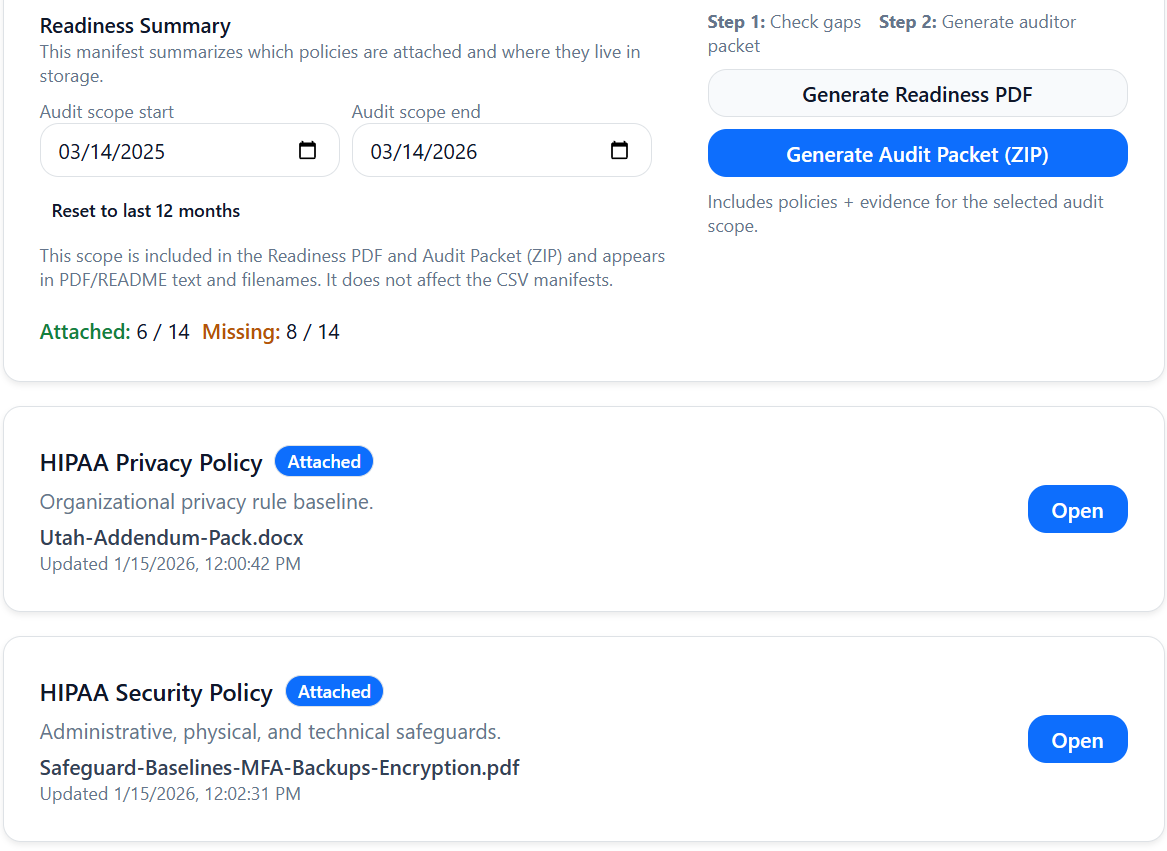
The Audit Wizard turns current application data into a focused preparation workflow. It helps teams find gaps and organize a response; it does not certify compliance or guarantee an audit outcome.
Assess readiness
Review current checklist, policy, documentation, and activity signals without treating a readiness summary as certification.
Prepare Audit Materials
Identify missing documentation and generate the materials that match the scope and period of a request.
Navigate audit day
Use the Audit Day Assistant to organize talking points, warnings, and relevant reports before responding.
Track follow-up
Review post-audit guidance and completion items while keeping the underlying compliance work unchanged.
Workforce Compliance
Keep workforce training and security awareness reviewable throughout the year
HIPAA Assistant helps organizations manage workforce compliance as an ongoing operational workflow. Track HIPAA workforce training requirements, record completion evidence, and maintain Security Awareness across every Service Period.
Roster and Service Periods
Maintain current and former workforce members with Service Period history, keeping role dates and historical staffing records clear for compliance reviews.
Job-Function Targeting
Define required training policies and target them by job function, ensuring workforce members receive requirements tailored to their specific roles.
Assignment and Status Tracking
Assign training and track current, due, overdue, and completed requirements across the organization throughout the year.
External Completions and Evidence
Record externally completed training and store supporting evidence, including completion certificates and admin verification records.
Security Awareness Activities
Track ongoing Security Awareness activities—such as reminders, phishing simulations, and awareness campaigns—separately from formal training courses.
Audit Readiness and Reporting
Review workforce readiness status and include training evidence and completion history in audit reporting.
Documentation and Audit Materials
Organize the source records behind the summary
Policies, uploads, and Audit Materials stay connected to the compliance work they support. Records maintained outside SecurePractice remain valid.
Policy Library
Organize policy documents, attachments, current status, and policy guidance in a workspace connected to compliance workflows.
Documents
Store policies, BAAs, training records, and other supporting documents in organized folders for your organization.
Audit Materials
Identify documents for audit outputs. When a guided upload already knows the intended material, SecurePractice can include it automatically.
Generic document uploads remain under your control, so your team can decide which records are appropriate to include in Audit Materials.
Reporting and history
Turn ongoing activity into a reviewable record
Use the Compliance Timeline to understand what happened, then generate the report or package that fits the request.
Compliance Timeline
Review a chronological history of checklist, document, incident, and Audit Materials activity with actor and date context.
Compliance Activity Report
Export a time-based PDF or CSV record of compliance activity for internal review or an audit request.
Compliance Audit Packet
Generate a current-state PDF summary that brings key compliance status and supporting information together.
Evidence Package & Readiness Report
Package selected supporting records in a ZIP and generate a PDF readiness summary based on current application data.
Daily operations
Keep compliance work connected between audits
Audit preparation works best when policies, incidents, documents, workforce training, and recurring activities stay current throughout the year.
Recurring work
Track recurring checklist activities, due dates, and progress so routine reviews remain visible.
Incident documentation
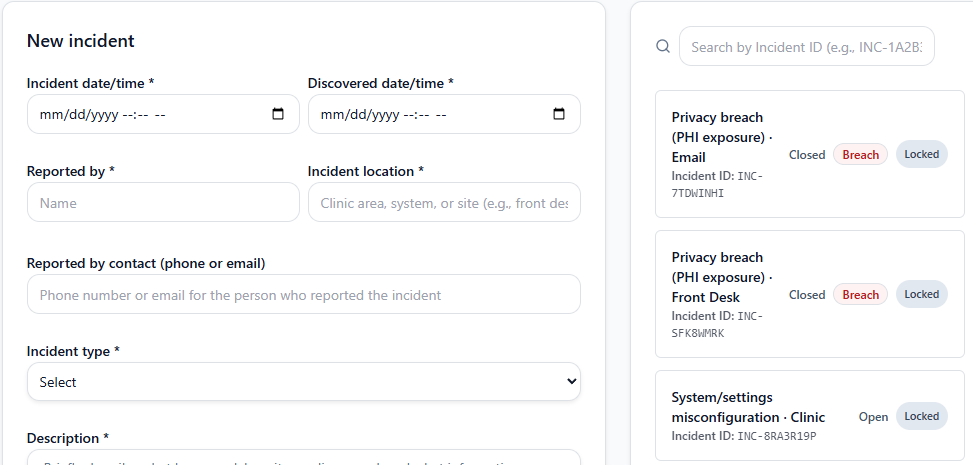
Document incidents, determinations, supporting evidence, review, and follow-up activity in one workflow.
Policy and evidence context
Keep the records that support a task close to the workflow without implying that storage alone completes the requirement.
Responsive workspace
Review tasks, guidance, records, and status from desktop, tablet, or mobile layouts.
Team collaboration
Give the people doing the work a shared place to participate
Premium includes five seats for owners, admins, and members. Existing role permissions keep billing, settings, documents, and compliance actions appropriately scoped.
Collaboration without shared logins
Bring practice leadership and staff into the same organization so activity is associated with the person who performed it.
Owner
Manages organization access, billing, and account-level decisions.
Admin
Supports day-to-day compliance work within existing permissions.
Member
Participates in permitted checklist and documentation workflows.
Build a more organized compliance routine
Start with the free checklist, then add guided workflows, organized documentation, collaboration, and audit preparation when your practice needs them.